
MMI plugin for WooCommerce
Data Pipeline – Import & Export for WordPress and WooCommerce
Import and export any WordPress or WooCommerce data on a schedule. Product imports show every change for review first.
Price range: $99.00 through $399.00 / year
Inside the plugin
The admin screens
Every MMI plugin runs our own store on mannmade.us before it ships. These are its real screens; anything that would show our store data is drawn as a placeholder bar.
Shimmering bars stand in for customer, product and order data.
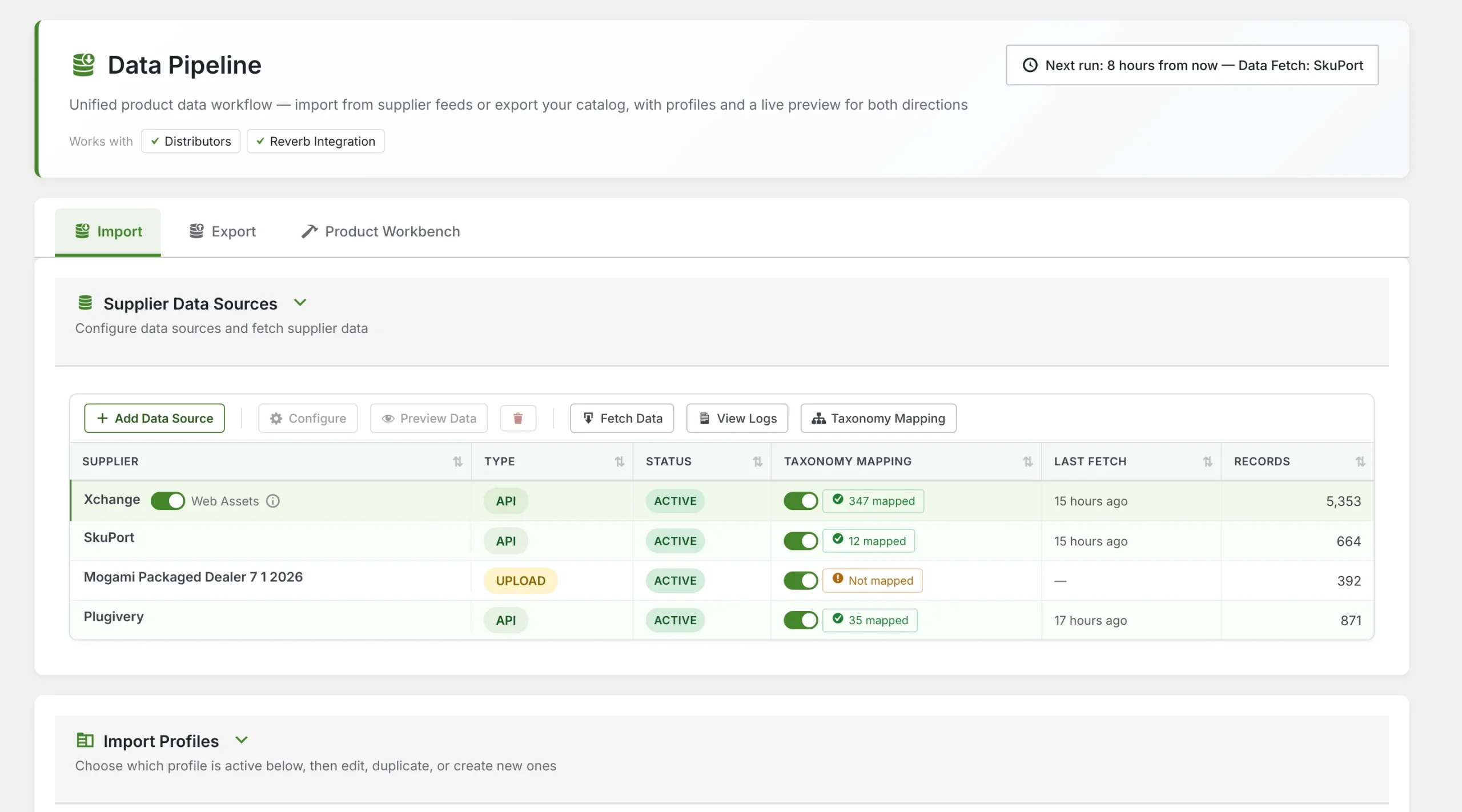
Supplier data sources
Every feed the store pulls from, in one table.
- Connect supplier APIs or upload CSV, TSV, JSON and XML files as sources
- Each source's type, status, last fetch and record count at a glance
- Fetch on demand, preview the raw data or open a source's logs from the toolbar
- Switch taxonomy mapping on or off per source
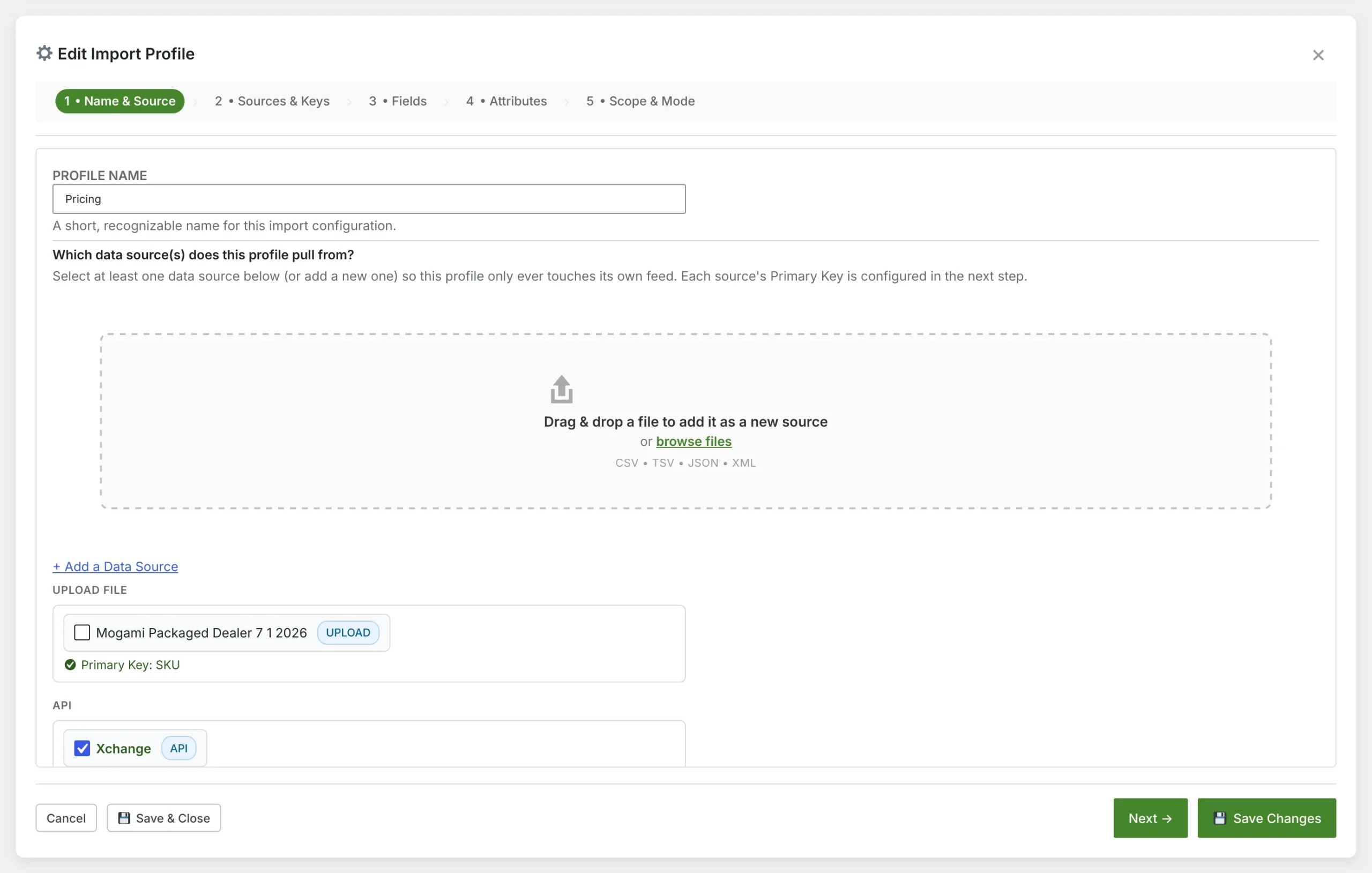
Import profile: name and sources
A five-step wizard sets up each import profile.
- Steps for name and sources, keys, fields, attributes, and scope and mode
- Drag and drop a file to add it as a new source without leaving the wizard
- One profile can pull from several sources, each matched on its own primary key
- Save & Close at any step; changes save as you go
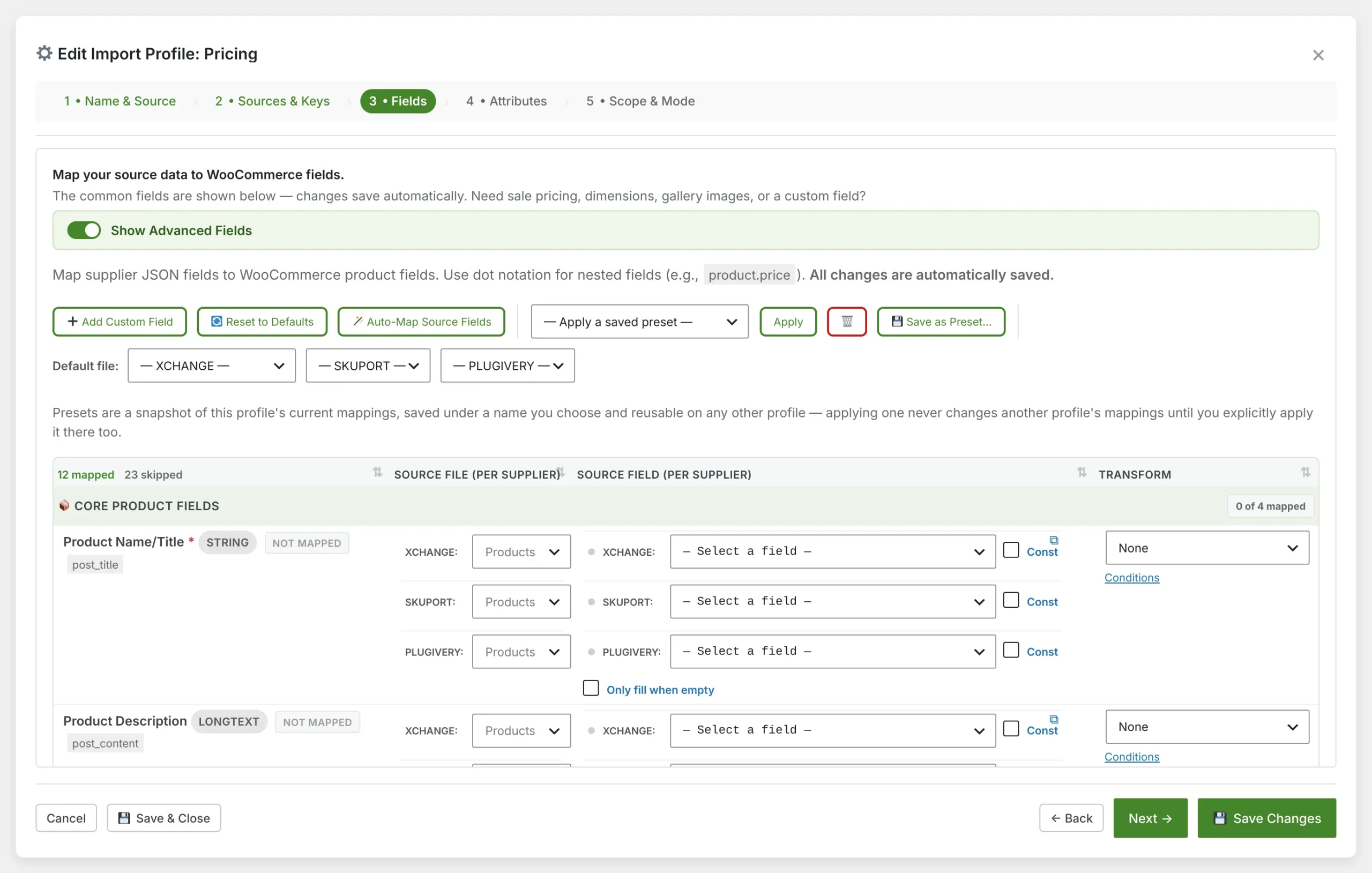
Field mapping
Map each supplier's fields to WooCommerce fields.
- A field picker per supplier, so every feed maps in its own shape
- Constants, transforms and conditions on any field
- Auto-map source fields, or save the mapping as a preset for other profiles
- Advanced fields cover sale pricing, dimensions, gallery images and custom fields
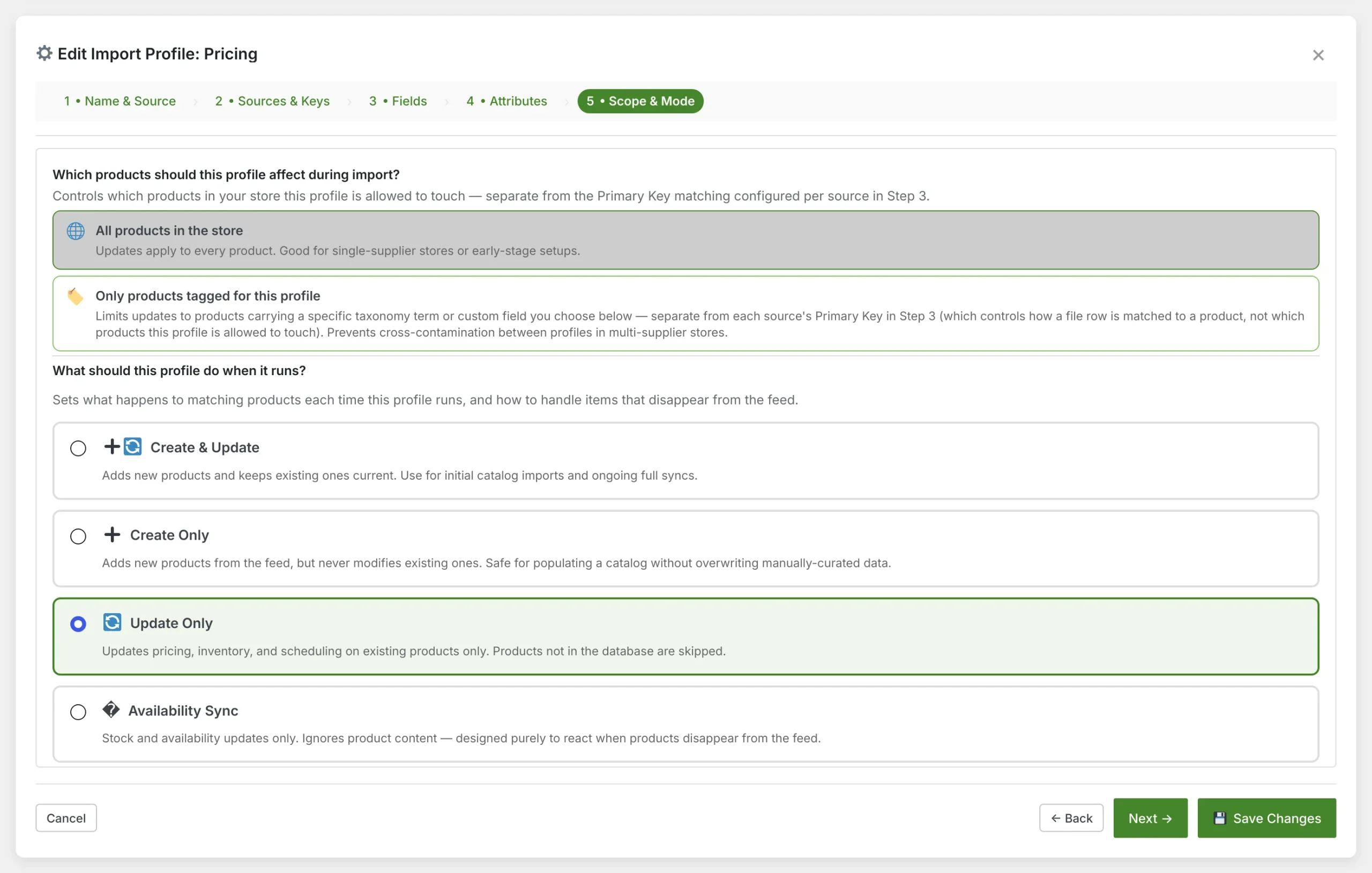
Scope and mode
Decide which products a profile may touch, and what it does to them.
- Limit a profile to products tagged for it, so suppliers never overwrite each other
- Create & Update, Create Only, Update Only or Availability Sync
- Update Only keeps pricing and stock current without adding new products
- Availability Sync reacts only when products drop out of a feed
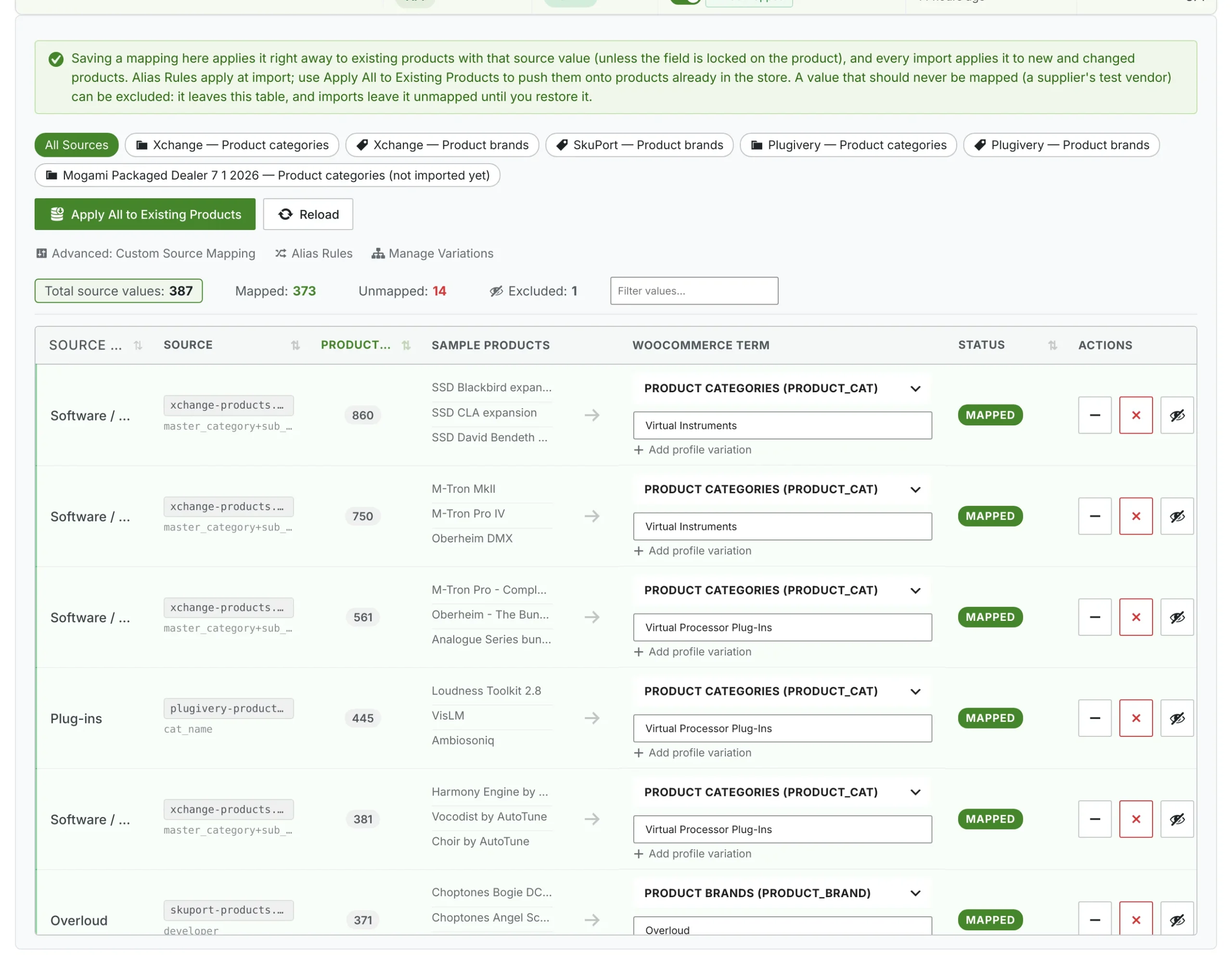
Taxonomy mapping
Turn supplier categories and brands into your own terms.
- Map each supplier value to a WooCommerce category or brand once, picking categories from a searchable tree
- Sample products beside every value, so you can check a mapping before saving it
- Profile variations, alias rules and a filter for unmapped values
- Apply all mappings to existing products in one click
- Supplier values never turn into stray categories or brands of their own
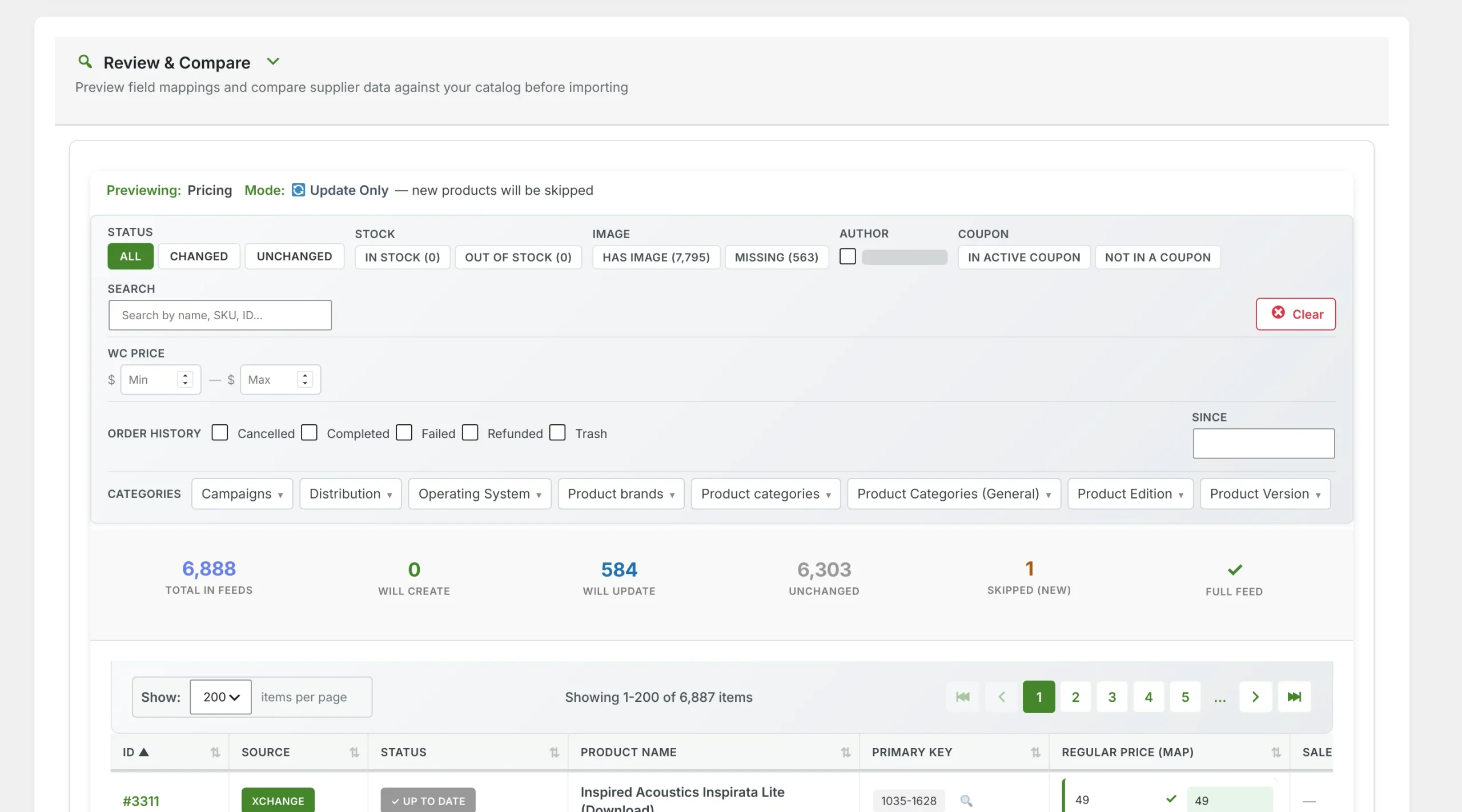
Review & Compare
See exactly what an import will do before it runs.
- Totals for the full feed: how many products will be created, updated or left alone
- Filter by change status, stock, images, coupons, price range, order history and any taxonomy
- Search the feed by name, SKU or ID
- The preview follows the profile's own mode, so skipped products are shown as skipped
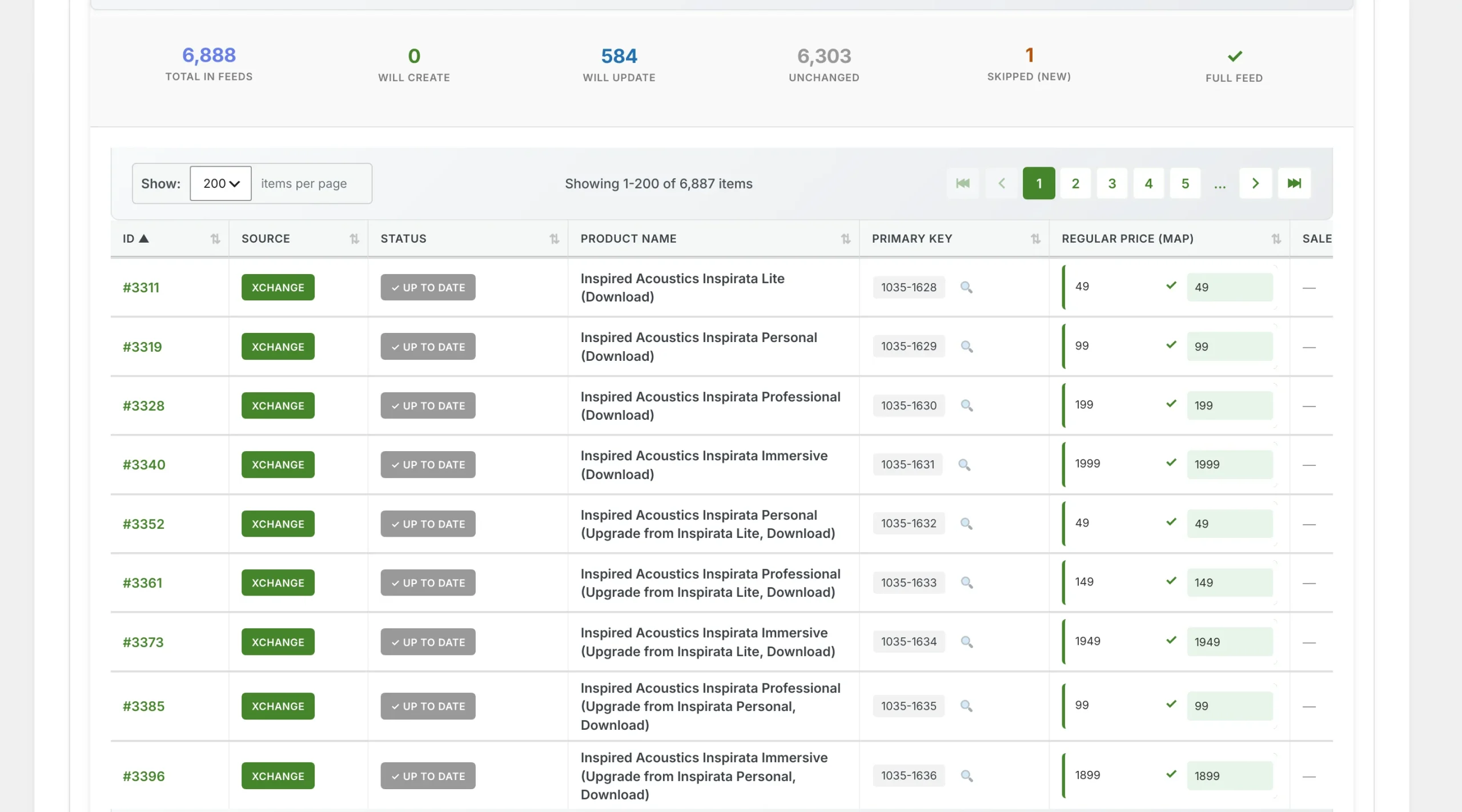
Row-by-row comparison
Your store's value beside the supplier's, for every field.
- Each product matched to its feed row by the supplier's primary key
- Current and incoming values side by side, with up-to-date rows marked
- Pages of up to 200 rows, sortable by any column
- Only real changes go through on the next run
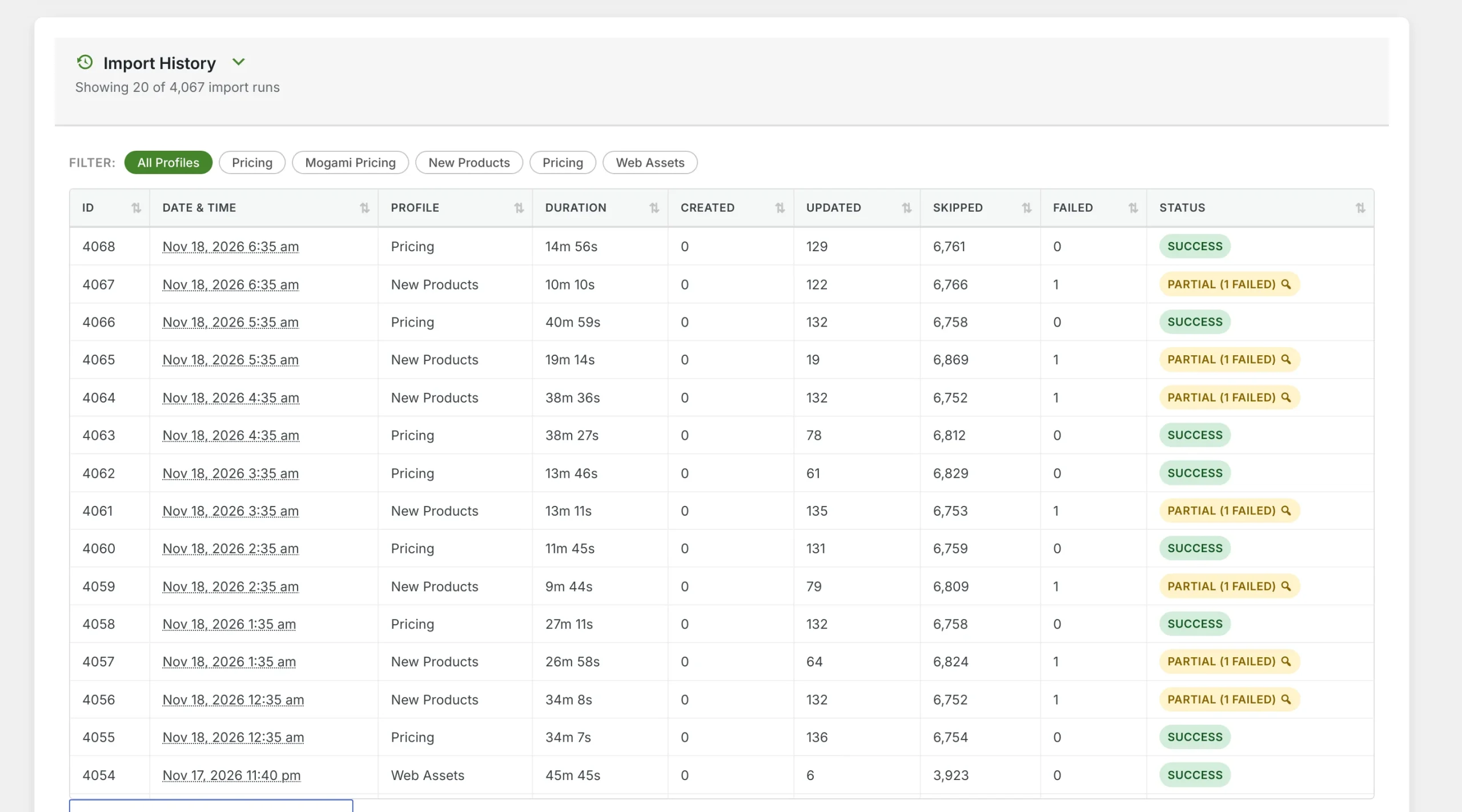
Import history
Every run, with what it did and how long it took.
- Created, updated, skipped and failed counts for each run
- Filter the history by import profile
- Partial runs open a report of the failed records and why they failed
- Load the full recent history on demand
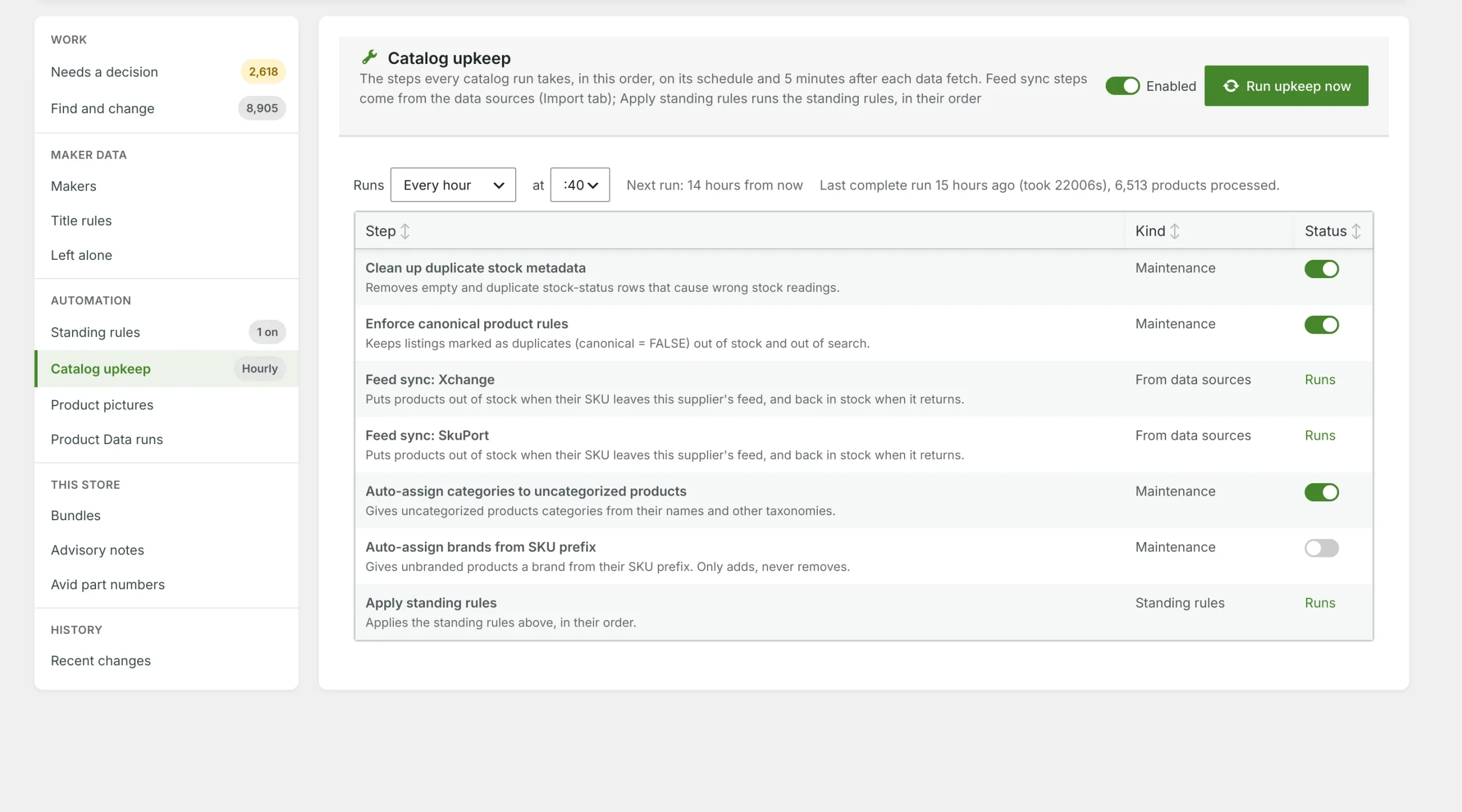
Catalog upkeep
The steps every catalog run takes, in order.
- Clean up duplicate stock data and apply main-listing rules
- Feed sync marks XChange and SkuPort products out of stock when they leave the feed, and back when they return
- Assign categories to products that have none
- Runs on a schedule or now; switch each step on or off
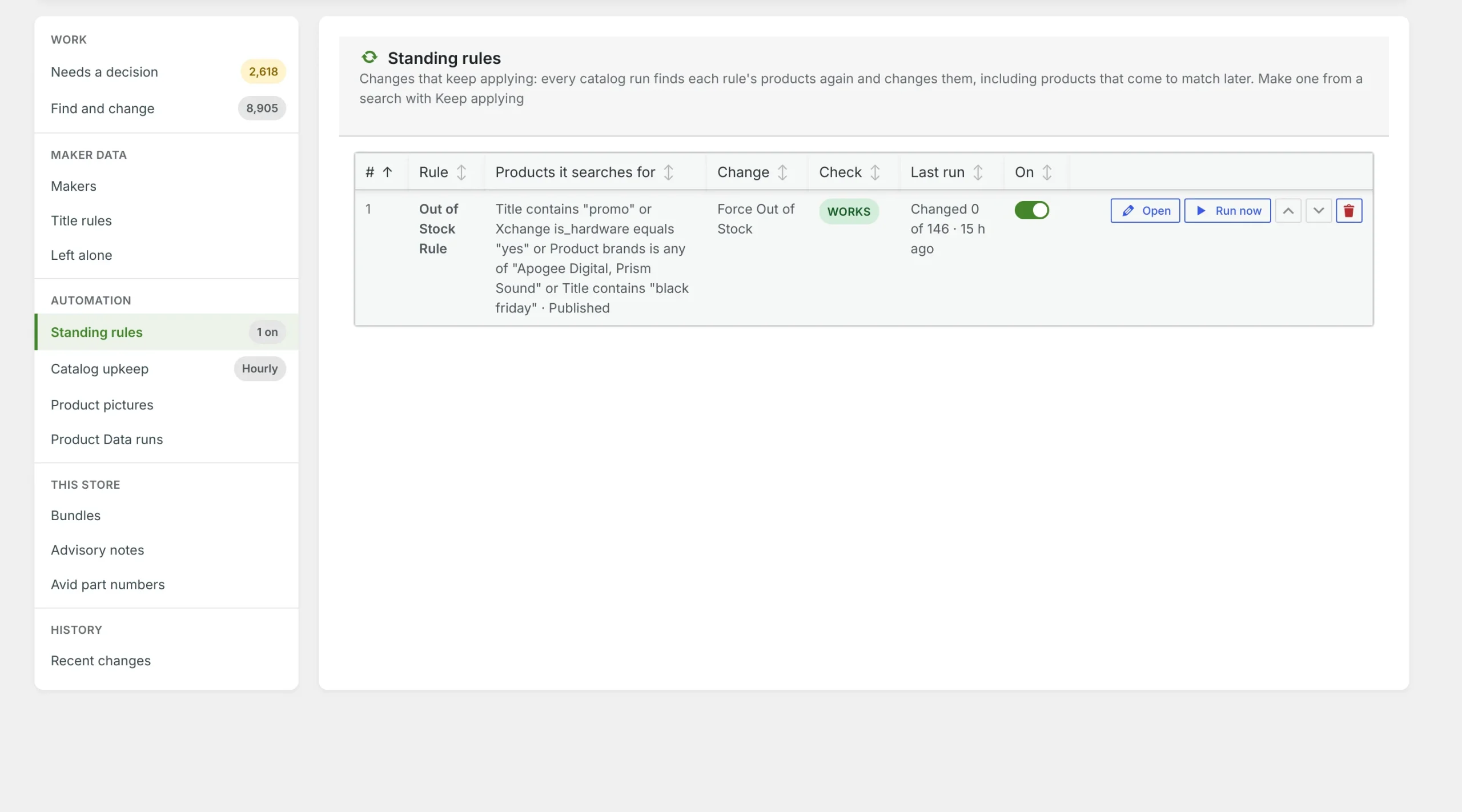
Standing rules
Changes that keep applying to every product that matches.
- Start from any Workbench search and pick a change
- A check before saving warns when a rule would undo itself or fight feed sync
- Each rule shows what it changed on the last run
- Save a search and load it into any other rule
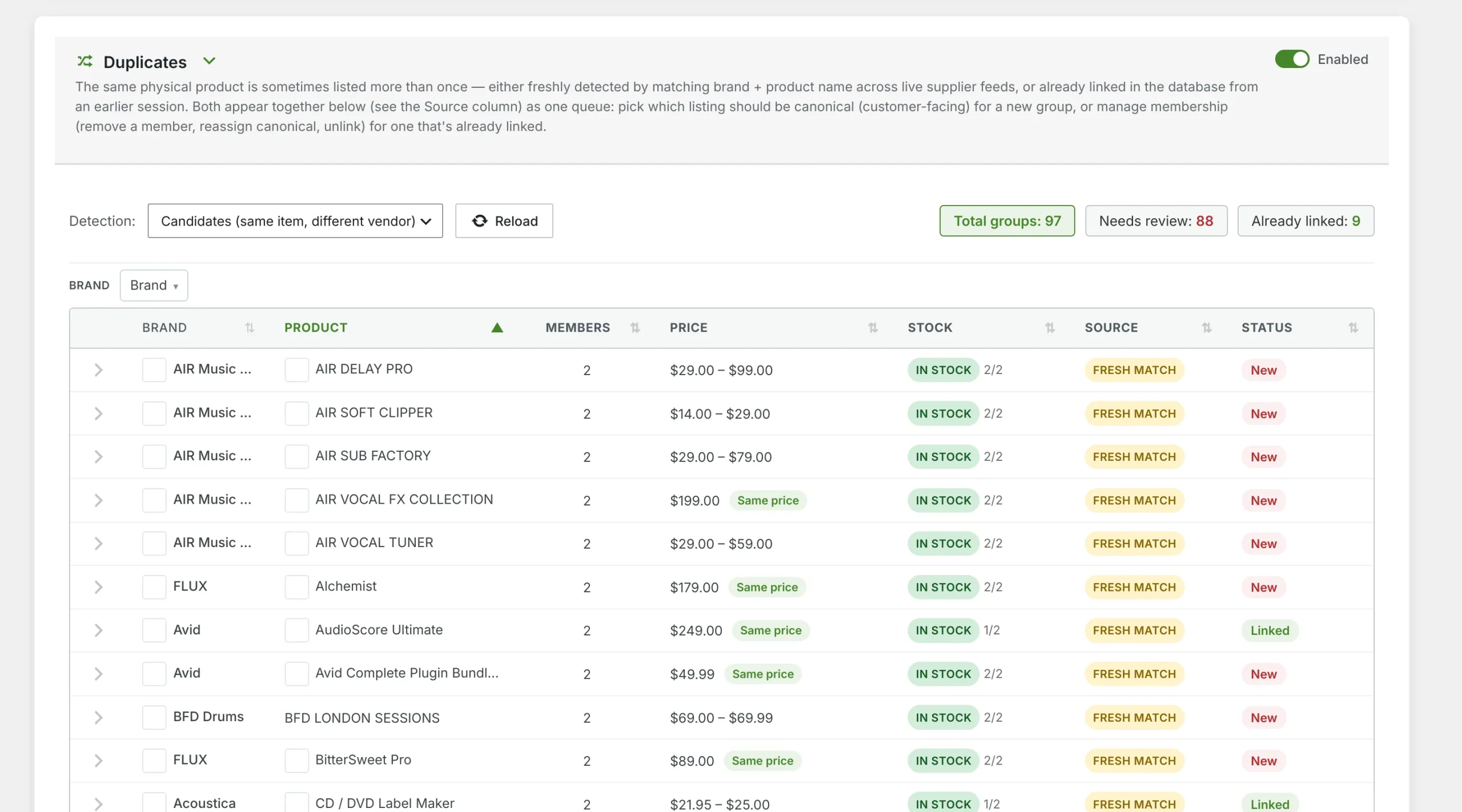
Duplicate finder
The same product from different suppliers, grouped together.
- Groups found across your XChange, SkuPort and Plugivery feeds, by maker and name, plus older listings of the same product
- Each group's members and the cost spread between suppliers
- Choose the main listing. The others are marked out of stock, left out of search and point search engines at the main one
- New groups to review are counted apart from groups already linked
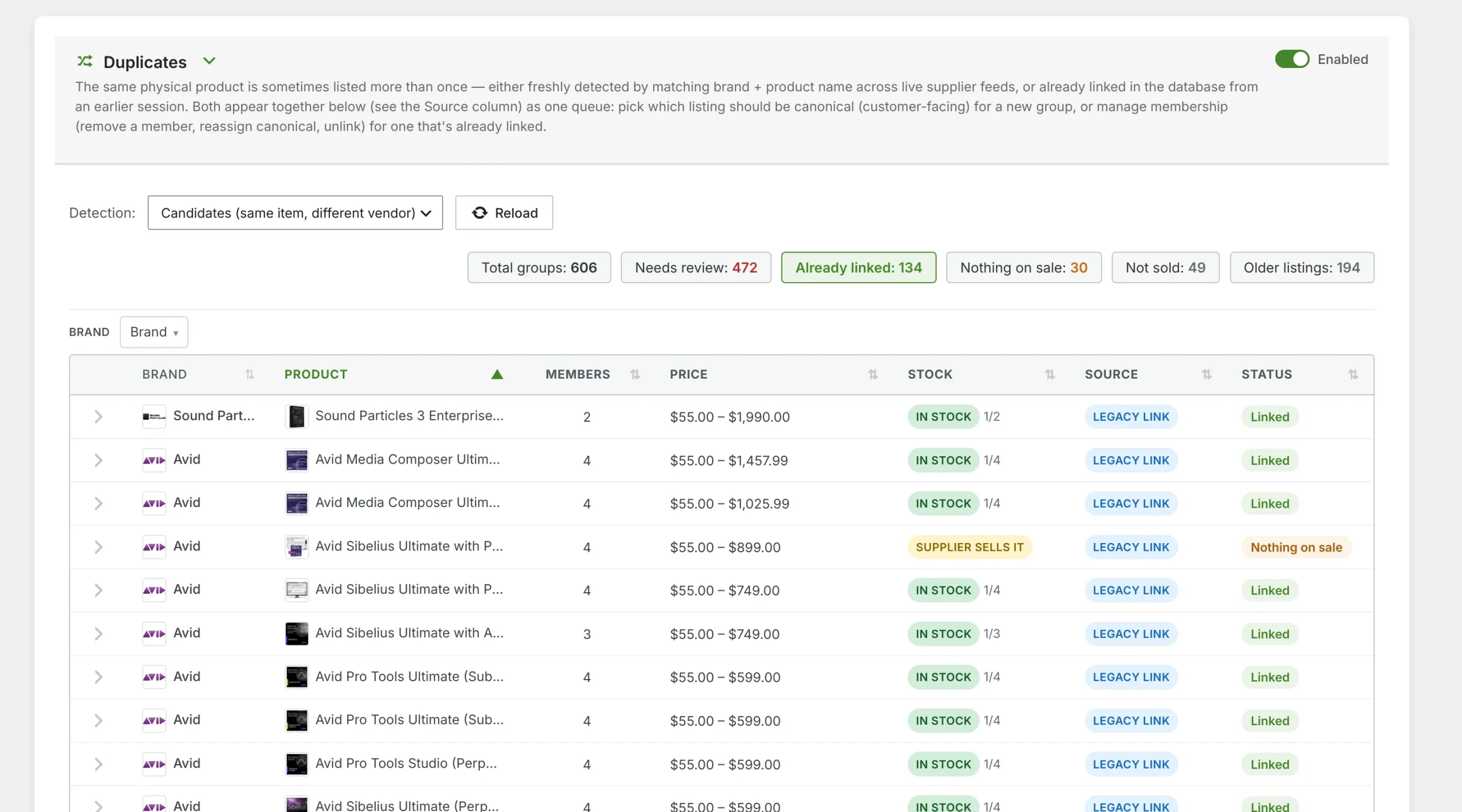
Linked listings
Groups already linked, and how each was matched.
- Matches by shared part number are flagged for review
- Remove a member, reassign the customer-facing listing, or unlink a group
- Sort by brand, product, members or cost spread
Pricing
Pick your license
Every license is yearly and renews automatically until you cancel. Choose how many sites it covers. Need more later? Upgrade from My Account and the unused part of your year comes off the price. Website Care customers get 25% off the first year, applied at checkout.
Overview
What it does
MMI Data Pipeline moves data into and out of WordPress in three steps: fetch it, review it, then import. For products you see exactly what would change, row by row, before anything is written. It also handles orders, customers, coupons, users, comments, posts, pages, custom post types and taxonomies. The same engine exports in CSV, JSON or XML.
- Field mapping, taxonomy mapping and conditions
- Scheduled imports and exports with post-run reports
- Product Workbench: browse or search the whole catalog, edit in the table, and make bulk changes with undo
- Make a change once, or keep applying it on every catalog run (stock, prices, status, categories and more)
- Only fill when empty: an import never overwrites a value a product already has
- Supplier promotions: sale dates, promotion costs and a check for sales below cost
- Duplicate finder: link the same product from different suppliers and choose the main listing
- Product content: suggested titles, descriptions and pictures from the maker’s own pages, reviewed before they’re written
- Reference library: help and knowledge-base pages you read in Chrome are kept with their text and dates, ready to search
Requirements
WordPress with WooCommerce, PHP 8.0+. Title and description suggestions use your store’s AI connection.
What the license includes
- Updates delivered through WordPress’s own Updates screen, for as long as the license is active
- Renews automatically every year until you cancel; cancelling keeps the license working to the end of the paid year
- Support by email
- Use on 1, 5 or unlimited sites (pick below); move it between sites any time from My Account → Licenses
- GPL-2.0-or-later code
Get started
Up and running in minutes
Buy a license
Choose how many sites it should cover. Your key arrives by email and in My Account → Licenses.
Download and install
Download the ZIP from My Account → Licenses, then upload it under Plugins → Add New → Upload Plugin.
Paste your key
Enter the key in the plugin’s License panel. Updates then arrive through WordPress like any other plugin.
MMI Suite
Works well alongside
Email Customizer
Brand your WooCommerce emails, send automatic sale emails to customers who opted in, and check that your mail reaches inboxes.
Details →Real-Time Server Monitor
Live server health for WordPress: load, CPU, memory and visitors at a glance, with likely bad visitors flagged.
Details →Subscriptions
A self-contained subscription engine for WooCommerce: recurring billing, renewals, switching and payment retries.
Details →Distributors
Buy software licenses from XChange, SkuPort and Plugivery for your WooCommerce orders: one queue, one catalog, and nothing bought until you confirm.
Details →Store Suite
All five MMI plugins under one license: Data Pipeline, Distributors, Subscriptions, Email Customizer and Real-Time Server Monitor.
Details →Questions before you buy?
Ask us whether Data Pipeline fits your store. We use it every day.