
This item cannot be returned.
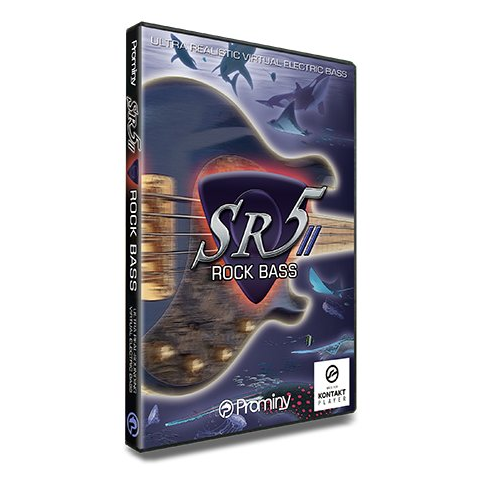
Prominy SR5 Rock Bass 2 (Download)
ID: 12682
• MPN: PVI0013
• SKU: 1173-6

Authorized Dealer


In Stock


$134.00
100 in stock
Key Features
- • Incredible real-time playability – SR5 SPI (Super Performance Instrument)
- • Built-in effects and amp simulator
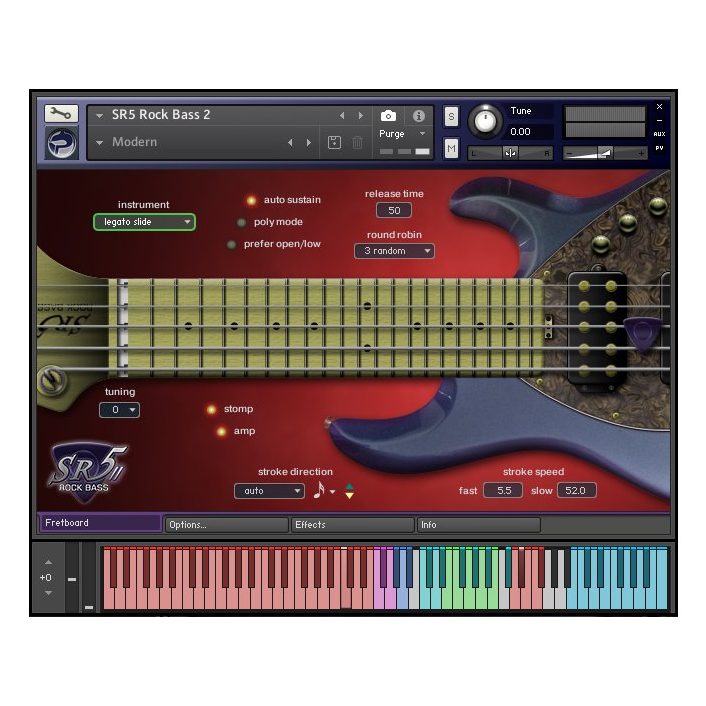
- • Fretboard Monitor
- • Natural harmonics on all frets / all strings
On Sale



Prominy SR5 Rock Bass 2 Overview
- Detail
- Demo
- Spec
SR5 Rock Bass 2
Ultra-realistic virtual bass guitar capturing the true sound of a Music Man® StingRay® 5—over 26 GB* and approximately 21,700 samples.
- Demo
- Buy
- Fretboard
- Effects & Amp
- User Chord Editor
- Instrument Select Key Switches
- Strum Settings
- Play Keys
SR5 Rock Bass 2 lets you build natural-sounding bass tracks that hold up as real performances.
“A lively-sounding and very playable virtual bass guitar … well suited to rock, metal and progressive genres, and adaptable to many other styles … high-quality, detailed and lively sound.” —Sound on Sound Magazine
I stumbled across SR5 Rock Bass and was totally blown away with it.” —Steve Mann composer / guitarist / keyboardist / producer / engineer (Michael Schenker, Lionheart, The Sweet, Eloy)
There is nothing else out there with this level of sophistication.
MAIN FEATURES
- Unparalleled Real-Time Playability—SR5 SPI (Super Performance Instrument) SR5 SPI lets you perform ultra-realistic bass guitar parts in real time. Instantly access a wide range of playing techniques without interrupting your performance, and create convincing bass tracks with speed and precision. • Real-Time Legato Slide • Real-Time Hammer-on & Pull-off • Real-Time Trill • Real-Time Picking Tremolo • Heavy Buzz Sustain • Heavy Hammer-on • Mute & Picking Noise • Double stops (2-string dyads) • Full chords • Gliss Down • Natural Harmonics (all strings, all frets) • Fret Noise, Tap Noise, Pick-Stop Noise, Bridge Mute Noise, Release Noise, Position Change Noise, Pat Stop Noise, Strum Noise • Special FX and noises • …and more As with any virtual instrument, the realism and playability achievable in real-time performance may vary depending on playing technique, workflow, and musical context.
- Fretboard Monitor The SPI engine automatically selects the optimal string and fret position based on your performance, and you can also switch strings manually using key switches. The Fretboard Monitor shows the current fret position and playing technique in real time.
- Effects and Amp Simulator SR5 Rock Bass 2 includes built-in stomp effects and bass amplifiers, letting you shape your tone to suit the genre you are working in. You can also bypass them entirely and use your favorite amp simulator.
- Heavy Buzz Sustain The Heavy Buzz Sustain samples carry a loud buzz and rattle, captured by plucking the string very hard. They add wildness, richness and realism to your bass tracks.
- Heavy Hammer-on SR5 Rock Bass (ver.1) already included hammer-on samples, but SR5 Rock Bass 2 adds a different type. The Heavy Hammer-on samples emphasize the metallic noise produced when the string strikes the fret under a forceful hammer-on. Where the normal hammer-on samples suit legato playing, the Heavy Hammer-on samples are made for accents—you can reproduce the sharp, metallic attack (close to a slap bass sound) of hammering hard onto a string immediately after an open note.
- Real Down-Tuning Samples Included SR5 Rock Bass 2 captures the Music Man® StingRay® 5, one of the most popular 5-string basses among players. A 5-string bass already reaches low B in standard tuning, and SR5 Rock Bass 2 goes further with real down-tuning samples—down four semitones to low G—covering everything from rock and metal to pop.
- Real-Time Legato Slide / Real-Time Hammer-on & Pull-off SR5’s Real-Time Legato Slide uses actual legato samples to deliver the expressive nuance of a finger sliding along the string—something pitch-based emulation simply cannot replicate. Hammer-ons and pull-offs are also real recorded performances, not emulations. Real-Time Legato Slide and Hammer-on & Pull-off are available on every instrument except the FX instruments—chord instruments included.
- User Chords The User Chord Editor lets you create custom chord shapes with full control over every string. You can define exactly how each string behaves: whether it sustains or is muted, whether it produces picking noise, whether it always plays open regardless of the fret position, whether it is included in the strum, whether it is the root string, and more.
- Noise / FX Samples A bass never falls silent cleanly. To stop a note you have to touch the strings, and that contact—from a finger, the palm, or a pick—makes a sound of its own. SR5 Rock Bass 2 captures a wide range of these noise and FX samples, the details that make a programmed bass track convincing.
- Direct (DI) Signals from the Bass Every sample was recorded as a direct (DI) signal straight from the bass, with no amp or effects in the signal path. That means you can shape your tone to match any musical style—using SR5’s built-in amp simulator, or your favorite third-party amp plug-in.
- Intelligent Instrument Key Switches with Chord Recognition You can instantly select any instrument or articulation using the Instrument Select Key Switches, and every articulation can be freely assigned to any key, so you can build your own key switch map. These switches also feature chord recognition: you can call up a chord instrument not only by pressing its assigned key, but simply by playing the notes of that chord within the key switch range. In other words, there is no need to memorize specific key switches—just hold the chord in the designated range and you are ready to play.
- Customizable Strum Key Beyond the User Chord Editor, you can also customize how each string responds when it is triggered by the Strum Keys or the Normal Key.
- Arpeggio Key Each string has a dedicated Arpeggio Key. When you select a chord instrument, the notes of that chord are automatically assigned to the corresponding Arpeggio Keys, so you can play arpeggios intuitively. Note that this is not a traditional arpeggiator: it lets you play the individual notes (strings) of a chord yourself, one at a time.
- Auto Stroke Detection SPI’s Auto Stroke Detection analyzes the current beat position and automatically chooses the appropriate stroke direction—down or up. Several detection modes are available, and you can always take manual control.
- NKS (Native Kontrol Standard®) Ready SR5 Rock Bass 2 officially supports NKS (Native Kontrol Standard®), which allows for intuitive, seamless integration with KOMPLETE KONTROL keyboards and MASCHINE hardware. You can control the main parameters directly from a KOMPLETE KONTROL S-Series keyboard or from MASCHINE hardware and software, and the Light Guide on S-Series keyboards shows the available key switches and the playable key range of each articulation.
System Requirements
Mac
• Disk space: 14 GB
• This product uses Kontakt Player as a playback engine. The system requirements of this product is the same as that of Kontakt Player. For the latest information about the compatibility, please visit
• https://www.native-instruments.com/en/products/komplete
Windows
• Disk space: 14 GB
• This product uses Kontakt Player as a playback engine. The system requirements of this product is the same as that of Kontakt Player. For the latest information about the compatibility, please visit
• https://www.native-instruments.com/en/products/komplete